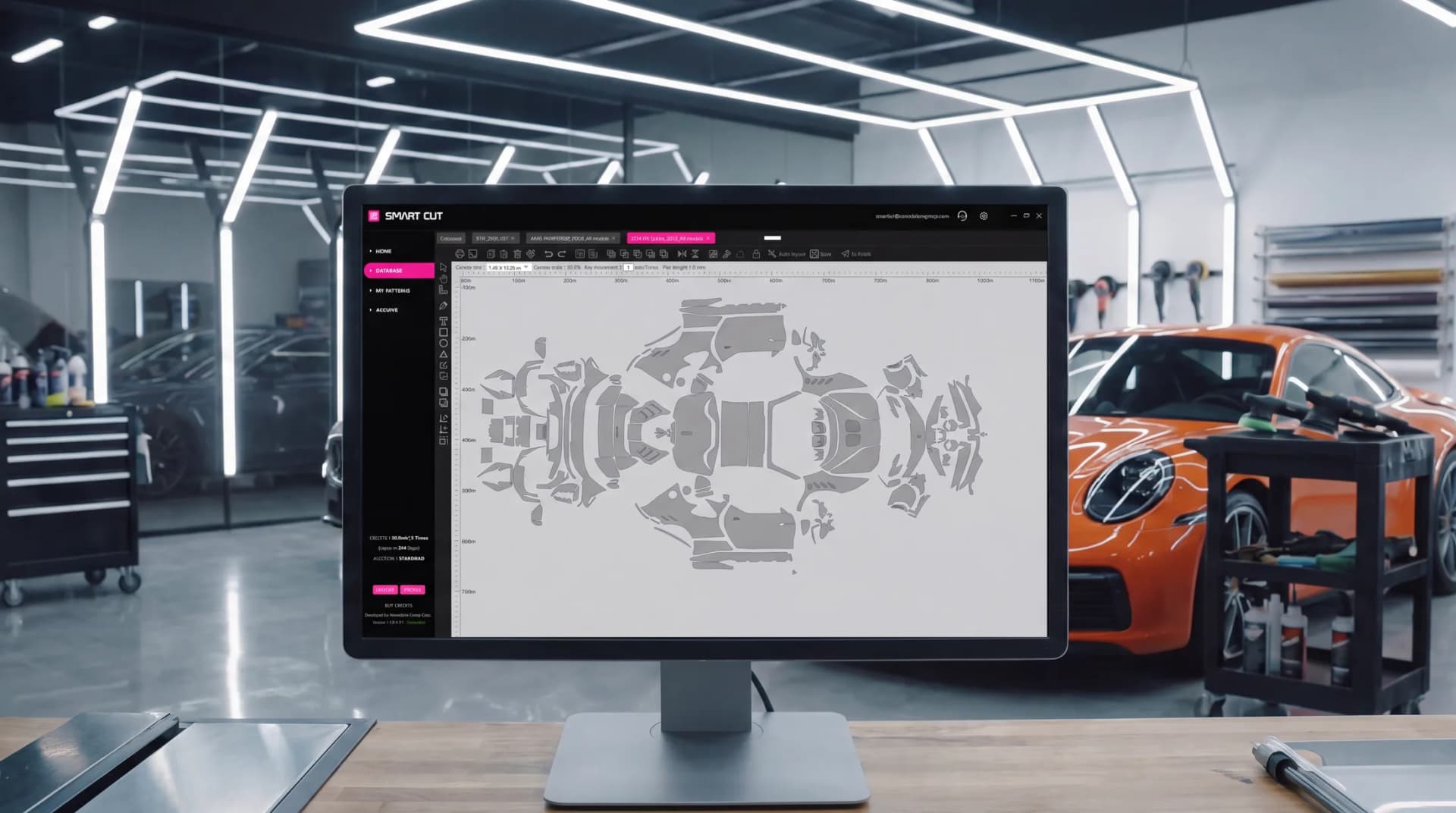
Ceramic Pro Smart Cut

Patterns for every car, AI Auto Layout and precision 3D-scanned templates — saving up to 30% of working time and film on every job.
Free trial · Windows 10 / 11
Everything a cutting station needs
One platform covers the full workflow — from finding the pattern to sending it to the plotter.
More profitable
Cut faster with less waste. Smart Cut saves up to 30% of working time and overall expenses on every job.
Extensive database
An ever-growing pattern database for cars, motorcycles, and watches from manufacturers worldwide — including window film patterns for vehicles.
AI Auto Layout
Advanced AI automatically arranges your cut patterns on the software canvas to maximise material efficiency — saving up to 20% more film compared to arranging patterns manually on the canvas.
Open access
Buy cutting credits your way — pay-per-meter packages, or unlimited cutting area with the Monthly or Annual plan.
Built-in payments
Pay instantly inside the software with PayPal or a credit or debit card.
3D-scanned precision
Templates come from state-of-the-art 3D scans that account for the shape of every part, the flexibility of the film, and edge wraps where required.
See Smart Cut in action
A short tour of the software — from finding the right pattern to cutting, with a focus on what Smart Cut brings to your business.
- Find the pattern you need in seconds
- Let AI Auto Layout optimize the canvas
- Save film and reduce cutting risks
- Train staff faster and complete jobs more efficiently
- Reduce costs and increase profit
Quick start in 5 min
Up and running in three steps — from download to your first accurate cut.
- 1
Download the app
Install Ceramic Pro Smart Cut on a Windows 10 or 11 PC.
- 2
Create your account
Register directly in the software to set up your workspace.
- 3
Activate your free trial
Open the Buy Credits section and activate your free trial instantly — without waiting for approval or additional authorization.
Free trial · Windows 10 / 11
Everything you need to get cutting
Watch the full guide, then keep the manuals close.
Please note: the credit activation steps shown in this video (KAVACA Smart Cut) are outdated — credits now activate automatically, no codes required. Updated multilingual video coming soon.
User manual
Full step-by-step PDF guide to installing and using Smart Cut.
Need help?
Our team answers installation, activation and cutting questions.
Compatible plottersCheck the list of supported plotters before you connect your device.
USBPlease note: Smart Cut connects to plotters via USB cable only.
GCC
Jaguar, Puma, Expert, RX & VII Series · i-Craft · ZenCut · Sable · Vogue · ECO2 · MLP2 · AR-24
Graphtec
5000, 6000, 7000, 8000, 8600 & 9000 Series · CG130SR II · CPT1520
Saga
kele-3 · CNC2 · CNC3 · 100
Roland
GR540 · GR640
Mimaki
CG-FX160/60SR · GS-FX160Plus
Others
Summa D-160 · Gunner DSG Plate · TENETH T-series · TiVEN V175
Don't see your plotter on this list? It may still be compatible. Please send us its PID and VID for verification. If you're unsure how to find these numbers, please .
Why installers switch
How the workflow changes when pre-cut patterns replace shaping and trimming film on the vehicle.
| Stage | Traditional bulk installation | Ceramic Pro Smart Cut |
|---|---|---|
| Finding the pattern | Traditional bulk installationFilm is shaped and trimmed manually on the vehicle | Ceramic Pro Smart CutSearch the worldwide database — cars, motorcycles, watches, and window film |
| Fit | Traditional bulk installationFit depends on the installer’s skill and hand trimming | Ceramic Pro Smart CutPrecision patterns from 3D scans, with edge wraps where required — consistent fit every time |
| Film waste | Traditional bulk installationMaterial use depends on manual sizing and cutting | Ceramic Pro Smart CutPre-cut patterns reduce material waste, with AI Auto Layout improving film efficiency even further |
| Risk to paint | Traditional bulk installationHand trimming with a blade on the vehicle | Ceramic Pro Smart CutCut on the plotter, then apply to the vehicle |
| Time & cost per job | Traditional bulk installationBaseline | Ceramic Pro Smart CutUp to 30% saved on working time and overall expenses |
| Hand-cutting skills | Traditional bulk installationRequires advanced hand-cutting skills | Ceramic Pro Smart CutReduces reliance on hand-cutting skills with ready-to-cut precision patterns |
| Staff training | Traditional bulk installationLonger learning curve for consistent results | Ceramic Pro Smart CutSimplifies training and helps installers become productive faster |
Trusted by installers worldwide
From the USA and Europe to Southeast Asia — and dozens of other countries — shops cut with Smart Cut every day.

Start cutting today.
Download the software, activate your free trial and see how much time and material you save on your very next job.
Free trial · Windows 10 / 11
Frequently asked questions
Getting started
How do I start using the software? Is there a trial period?
Download Smart Cut from the official website, install it on your computer, register an account and activate the trial period to explore all features.
How do I activate the trial?
After installing the software and completing registration, open the Buy Credits section and activate your free trial instantly — no approval or additional authorization needed.
How much does Ceramic Pro Smart Cut cost?
Several cutting-credit packages are available inside the software: two packages based on square meters (50 or 100 m²) usable within 365 days, which also include a number of free Auto Layouts; and Monthly or Annual packages with unlimited cutting area — Auto Layouts are not included but can be purchased separately.
How long can I use the purchased credits for 50 or 100 square meters?
Credits for 50 or 100 square meters can be used within 365 days from the activation date.
How do I learn the features and tools of Smart Cut?
Refer to the PDF and video instructions in the Software Guide section inside the software, or on this page above. They walk through every feature with demonstrations.
Payments
Payment via card or PayPal fails. What can I do?
If a payment fails with the Debit or Credit card method, try PayPal — you can pay there with a bank card as well as a PayPal account. We can also issue an invoice payable by bank card, Apple Pay or Google Pay: send your billing details to support@nanoshine-group.com.
I purchased credits, but they haven’t appeared in my balance. What should I do?
Credits are applied to your account after a successful purchase. If your balance hasn’t updated, restart the software and check the Profile menu; if it’s still missing, contact support@nanoshine-group.com with your order details.
I bought Auto Layout credits, but the database is still not accessible. Why?
Auto Layout credits only cover the AI Auto Layout feature and don’t grant access to the cutting database. Cutting credits grant database access and enable film cutting; Auto Layout credits are for the AI Auto Layout feature only.
Why isn’t AI Auto Layout free with Monthly or Annual Unlimited subscriptions?
AI Auto Layout uses significant cloud computing resources, which incurs additional costs, so it isn’t included with unlimited cutting-area subscriptions. A limited number of Auto Layouts is included free with the 50 and 100 m² packages.
Features
What is the AI Auto Layout feature?
AI Auto Layout uses advanced algorithms and cloud-server power to arrange cut patterns on the canvas so material waste is minimised — saving up to 20% more film compared to arranging patterns manually on the canvas.
Can I edit the patterns?
Yes. Use pattern editing mode with tools such as Add Anchor and Edge Expansion. See the video manual in the Software Guide section for a detailed walkthrough.
Can I save a pattern in the software?
Yes. Click Save on the top toolbar — saved patterns are stored in the My Patterns section.
Can I import my own patterns?
Yes. Import your own patterns in PLT format with the Import custom PLT file option on the left toolbar.
Can I export patterns and save them on my computer?
Exporting patterns from the software is not supported, to ensure data integrity and security.
The pattern I need isn’t in the database. What should I do?
Contact Smart Cut Support with the exact model and modification of the vehicle or motorcycle, including photos from all four sides. We’ll do our best to expedite creating the pattern.
Usage and troubleshooting
Can I use the software on a Mac?
Yes, via Parallels running Windows. Install Parallels and Windows, download Smart Cut, install the Visual C++ driver package (link in the Software Guide), restart Windows in Parallels, then install and launch Smart Cut.
I installed the software, but the Home page is blank. What should I do?
This means the Visual C++ runtime drivers are missing. Download the Visual-C-All-in-One package from the Software Guide, unzip it, run install_all.bat as administrator, then restart your computer.
I can’t log in — it shows “Login Temporarily Limited”.
This usually happens when the computer isn’t authorized for your account, your network connection method changed (e.g. Wi-Fi to LAN), or extra USB devices are connected. Reconnect the previous way, remove additional USB devices and try again — or contact support@nanoshine-group.com.
How can I log into my account on another computer?
Perform a trial login on the new device so its ID is registered in the system, then contact support@nanoshine-group.com and we’ll link the device to your account.
Can I use my account on multiple computers at once?
No — for database security a single account can’t work on several devices simultaneously. To switch devices, contact support each time so we can link the new one.
Plotters and cutting
My plotter is on the supported list, but it doesn’t appear in the software.
Make sure the plotter is connected via USB — the software supports USB connections only. If it still isn’t recognised: restart the plotter and the software, check the plotter drivers, try another USB cable or port, or contact support@nanoshine-group.com.
My plotter is not on the supported list. Can I still connect it?
Connect it via USB and check whether it appears in the software — some plotters are recognised automatically. If not, send us the plotter model and its PID and VID; in some cases we can add support for additional plotters.
I have trouble cutting patterns correctly with my plotter.
Check the plotter’s command language (HP-GL / GP-GL) and set it to HP-GL or Auto Command mode. Check the step size — for example, 0.100 instead of 0.025. Then restart both the plotter and the software.
Smart Cut System
Precision templates from 3D scanning
State-of-the-art 3D scanners account for the complex shapes of car parts and the flexibility of the material — eliminating manual adjustment of pre-cut films during installation.
Smart Cut is the only precision film-cutting software of its kind in the world. Quick start takes about five minutes — from install to the first accurate cut.